
AI Stem Generator Plugin
Generate new instrument layers from your music. Compare four variation sets and drag your favorite WAV stems into your DAW.
VST3 for macOS and Windows · AU for macOS
AI Instrument Generation for Your DAW
Made for Producers
Your music. Your rules.
AI should help you create, not take control. Here's how NeuSynth puts producers first.
Your sound stays yours.
Keep your rights to the music you upload. Your projects stay private by default.
You're in control.
Opt out of AI model improvement anytime, without losing access to NeuSynth.
Create. Release. Repeat.
Release eligible Paid Outputs on streaming platforms, in videos or for clients.
How It Works
How the AI Stem Generator Works
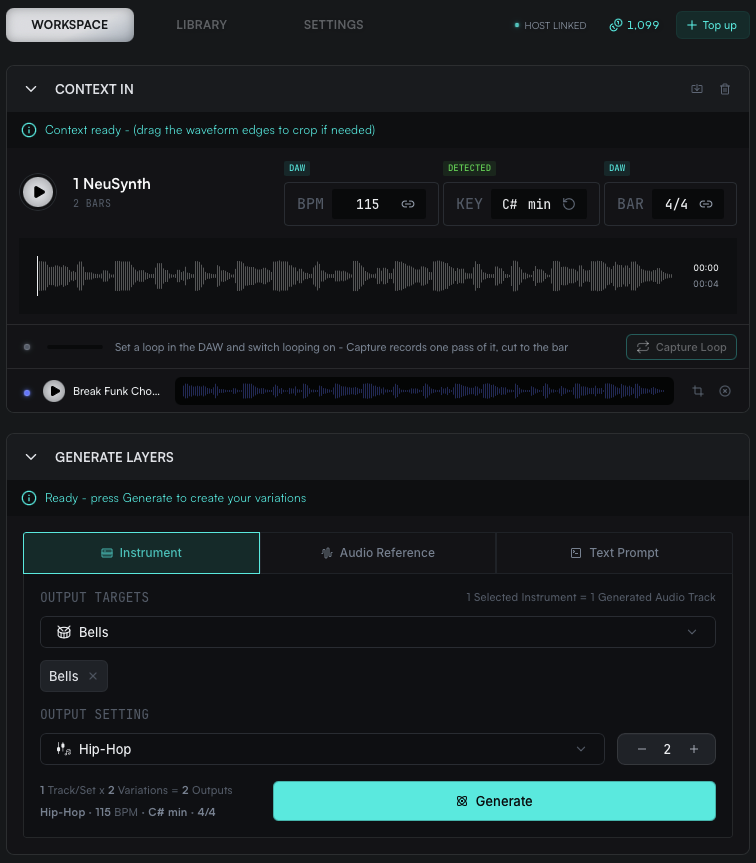
NeuSynth generates new instrument stems from a section of your track. Pick your Context, choose the layers you need, and compare four variation sets you can drag straight into your DAW.
Step 01
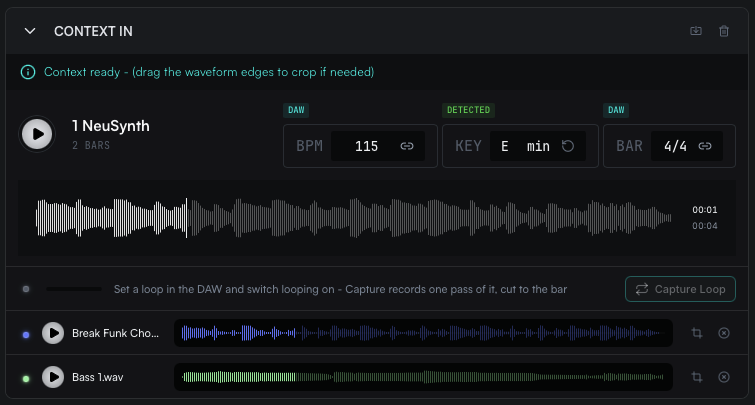
Pick your Context
Choose up to 60 seconds of the track you want to build on.
- Drag clips from your DAW
- Up to 60 seconds
- Preview before you generate
- Context is free
Step 02
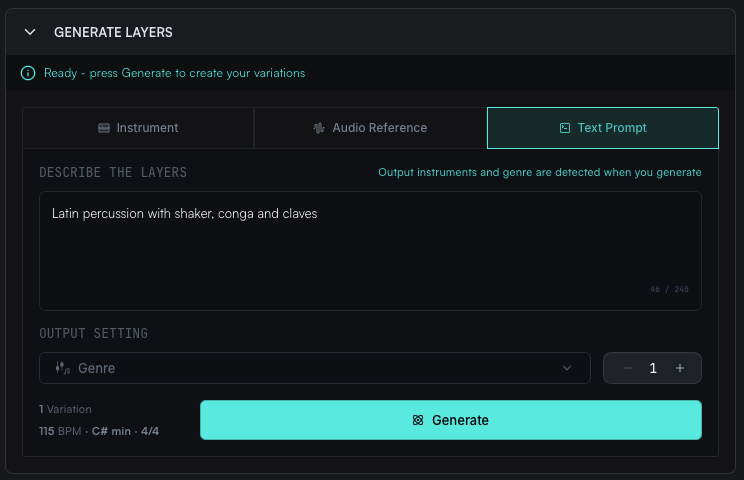
Choose what you need
Pick instruments, add a reference, or describe the layer in your own words.
- Instrument Category
- Audio Reference
- Text Prompt
- 1 to 6 layers per generation
Step 03
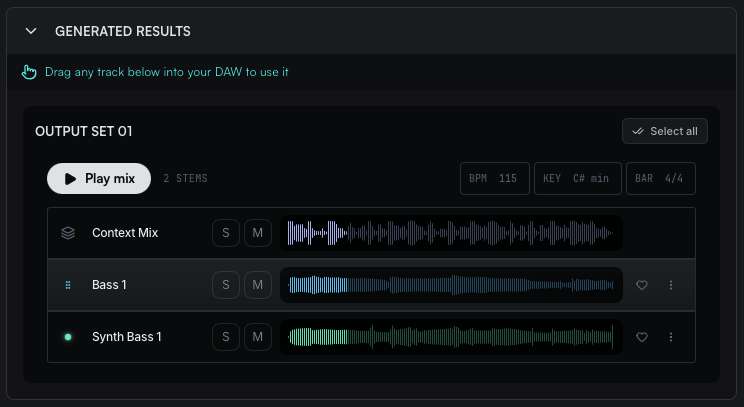
Generate four complete Variation Sets
Explore four different musical directions. Each set includes a separate WAV track for every selected instrument, generated to work together.
- Four fresh sets
- Hear each set with your Context
- Drag one track into your DAW
- Or drag the full set
Built for Producers
Made for producers who get stuck.
Build out loops, explore new layers, and keep creating without leaving your DAW.
Finish the idea
Add new layers when your loop needs somewhere to go.
Try another direction
Compare four different takes from the same Context.
Stay in your DAW
Preview and drag your favourites straight into your session.
Works where you make music.
VST3 Instrument
macOS and WindowsFor Ableton Live, Cubase, FL Studio, Fender Studio and other compatible VST3 hosts.
AU Instrument
macOSFor Logic Pro and other compatible AU hosts.
VST3 for macOS and Windows · AU for macOS
NeuSynth requires macOS 11.0 or later. Currently verified DAWs include Ableton Live, Cubase, FL Studio, and Fender Studio.
Pricing
More ideas when you need them.
Paid plans include monthly Generation Credits, while the Free Trial includes a one-time allowance.
1 Credit = 1 instrument × 1 variation, up to 30 seconds. Every Generate returns four variations per instrument, and a longer request costs one more Credit per started 30 seconds.
Try the workflow
Free Trial
24 Generation Credits
1 instrument at 30 sec: 6 Generate actions at four variations
- Pick your Context
- Choose your instruments
- Generate four complete Variation Sets
- Hear it with your track
- Drag it into your DAW
One-time allowance to explore the workflow. Expires 12 months after it is granted.
Free to explore · Non-commercial outputs
For regular creation
Starter
150 Generation Credits
1 instrument at 30 sec: 37 Generate actions at four variations
- Everything in Free Trial
- 150 credits every month
- All three generation modes
- Up to 6 instruments per generation
150 Generation Credits expire at the end of their original billing period.
Commercial use of eligible Paid Outputs
For frequent generation
Creator
400 Generation Credits
1 instrument at 30 sec: 100 Generate actions at four variations
- Everything in Starter
- 400 credits every month
- More room to explore
- Compare more sets
400 Generation Credits expire at the end of their original billing period.
Commercial use of eligible Paid Outputs
HOW CREDITS WORK
Credits, kept simple.
1 Credit = up to 30 seconds of 1 instrument × 1 variation. Every example below follows that one rule.
1
Generation Credit
4
Generation Credits
12
Generation Credits
Context Mix and Reference Audio inputs do not use Generation Credits.
3 instruments × 4 variations, each up to 30 seconds = 12 WAVs = 12 credits. Context is free.
The rules, at a glance.
1 Credit = 30 sec × 1 instrument × 1 variation
Every generated WAV is one variation of one instrument, up to 30 seconds long, and uses one credit.
Every Generate returns up to four variations
Every Generate returns up to four variations per instrument, so one instrument costs up to 4 credits per 30-second block.
Context & Reference are free
Context Mix and Reference Audio inputs do not use Generation Credits.
Monthly credits expire
Subscription credits expire at the end of their original billing period and do not roll over.
Earliest expiry first
The credits closest to expiring are used first. On a tie: bonus, then subscription, then welcome, then top-up.
Subscriber bonus credits
Anyone can buy a top-up. Subscribers also get bonus credits on top, and those expire 30 days after they are granted.
Top-ups expire in 1 year
Buy a top-up any time, with or without a subscription. Purchased credits expire one year after purchase.
Welcome credits last 12 months
Welcome credits expire 12 months after they are granted and can be used without a subscription.
Need more credits?
Buy a top-up any time. Subscribers get bonus credits on top of what they buy.
$1.99
CREDITS BY PLAN
purchased + bonus = total
$4.99
CREDITS BY PLAN
purchased + bonus = total
$9.99
CREDITS BY PLAN
purchased + bonus = total
Top-up credits expire one year after purchase. Bonus credits expire 30 days after they are granted.
Pricing may change in the future. Taxes may apply at checkout.
Frequently asked questions
NeuSynth generates new instrument layers from a section of music you choose inside your DAW.
Context is the section of your track NeuSynth uses to guide generation. You can select up to 60 seconds.
One of the alternative groups of generated tracks, you get up to four per Generate. Each set holds one WAV per selected instrument, and the tracks inside a set are designed to work together.
One request can be up to 60 seconds long. 1 Credit = one instrument at one variation, up to 30 seconds. Requests over 30 seconds and up to 60 seconds use 2 credits per instrument per variation. Every Generate returns up to four variations, so one instrument with four variations costs 4 credits at 30 seconds, or 8 credits at 60 seconds. Before generating, you can check the estimated credits for this generation below the Generate button.
Up to 30 seconds counts as one block. Any partial block rounds up, so 31–60 seconds counts as two blocks.
Yes. Every additional 30-second block multiplies the credit cost for the selected variations and instruments.
At up to 30 seconds, it costs 24 Credits. At 31–60 seconds, it costs 48 Credits.
No. Four variations with six instruments still creates 24 WAV files. The files are longer, so each one uses two 30-second credit blocks.
No. Generation Credits apply to the generated outputs, not the selected Context or uploaded Audio References.
It depends on the number of variations, instruments and duration you choose. Each instrument and variation costs 1 Credit for a request up to 30 seconds, or 2 Credits for a request over 30 seconds and up to 60 seconds. With four variations and one instrument, each Generate action costs 4 Credits at up to 30 seconds, or 8 Credits at over 30 seconds and up to 60 seconds. With one instrument and four variations, Starter (150 Credits) provides up to 37 Generate actions at up to 30 seconds, or 18 at over 30 seconds and up to 60 seconds. Creator (400 Credits) provides up to 100 and 50 Generate actions, respectively. You can check the estimated credits for each generation below the Generate button.
Yes. New users receive a one-time allowance of 24 Generation Credits to explore the NeuSynth workflow.
Trial credits are valid for 12 months after they are granted.
No. It is a one-time credit allowance and does not refresh each month.
It depends on the number of variations, instruments and duration. With four variations, one instrument and a duration of up to 30 seconds, 24 Credits provide up to six Generate actions.
Not yet. The MVP works on one selected section at a time.
You can confirm between 1 and 6 output targets per Generate action.
Yes. Add individual WAV tracks or a complete Variation Set.
Instrument Category picks instruments. Audio Reference uses a sound as direction. Text Prompt describes the layer in your own words.
VST3 for macOS is currently available. Windows is coming soon.
NeuSynth currently supports Ableton Live, Cubase, FL Studio, and Fender Studio.
Plans, Credits & Billing
Starter is $4.99/month and includes 150 Generation Credits.
Creator is $9.99/month and includes 400 Generation Credits.
No. Subscription Credits do not roll over. At normal renewal, unused Subscription Credits from the ending subscription period expire, and the new period's credits are granted. When you upgrade or downgrade, the new plan's Subscription Credits are granted immediately. Any unused Subscription Credits from your previous plan remain available until their original expiration date. Changing plans does not immediately remove existing credits or replace the entire balance with the new plan's allowance. After a plan change, credits with different expiration dates may coexist. Each grant expires separately on its own expiration date. Previously granted credits also remain available until their original expiration date if you cancel.
Purchased Top-up Credits are valid for 12 months from the purchase date.
Subscriber Bonus Credits expire 30 days after they're granted.
Yes. Welcome Credits can be used without an active subscription and remain valid for 12 months after they're granted.
Yes. Active Starter and Creator subscribers receive additional Bonus Credits when purchasing a top-up. Users without an active subscription can also purchase top-ups, but do not receive Bonus Credits.
Upgrades and downgrades take effect immediately. You'll be charged the full price of the new plan—not just the price difference—and receive the new plan's Subscription Credits immediately. Any unused Subscription Credits from your previous plan remain available until their original expiration date.
Cancellation takes effect immediately. The subscription fee you have already paid is not refunded. Any unused Subscription Credits already granted to your account remain available until their original expiration date.
No. Previously granted Subscriber Bonus Credits remain available until their original expiration date, 30 days after they were granted. Purchased Top-up Credits also remain available until their original expiration date. Changing or cancelling your plan does not remove these credits or restart their expiration periods.
Yes. Top-ups can be bought at any time, with or without a subscription. Subscribers also receive bonus credits on top of the amount they buy.
AI & Your Music
Our training approach includes licensed music from data providers and music contributed by producers under applicable agreements. Eligible account data may also help improve NeuSynth when Product Improvement participation is active.
We work with music-data providers and contributors through licensing and compensation arrangements. The terms depend on the source and agreement.
Yes. You keep the rights you already hold in the audio, recordings and original material you upload.
Yes. Your uploaded audio and generated results are private by default and aren't made available to other NeuSynth users.
Yes. Outputs created entirely with paid-source credits can be used commercially, subject to our Terms. Outputs made with free Welcome Credits are for non-commercial use only. An individual Output that uses Welcome Credits remains non-commercial even if paid-source credits are also used, unless expressly stated otherwise.
Yes. Rights already granted for eligible Paid Outputs continue after your subscription ends.
No. We don't sell Product Improvement Data or allow unrelated companies to use it to train their own AI models.
Yes. Add music you own or have the necessary rights or permission to use as Context or Audio References.
Files & Storage
Standard formats like WAV, AIFF and MP3.
Files are stored securely and are only accessible to your account.
Uploaded Context and reference files are kept only as long as needed to run the generation, any history feature you use, or Product Improvement while it is active. The Privacy Policy sets out the full retention and deletion terms.
Stuck on a loop?
Find the next layer.
Generate new instrument stems with NeuSynth.